TABLE OF CONTENTS
- Overview
- Why Use "Are you a customer? Login here"?
- How to Sign In
- Do Not Use the Standard Login Form
- Troubleshooting
Overview
To access HCo Help Desk articles and submit support requests, always sign in using the "Are you a customer? Login here" option. Do not use the standard email and password login form at the top of the page.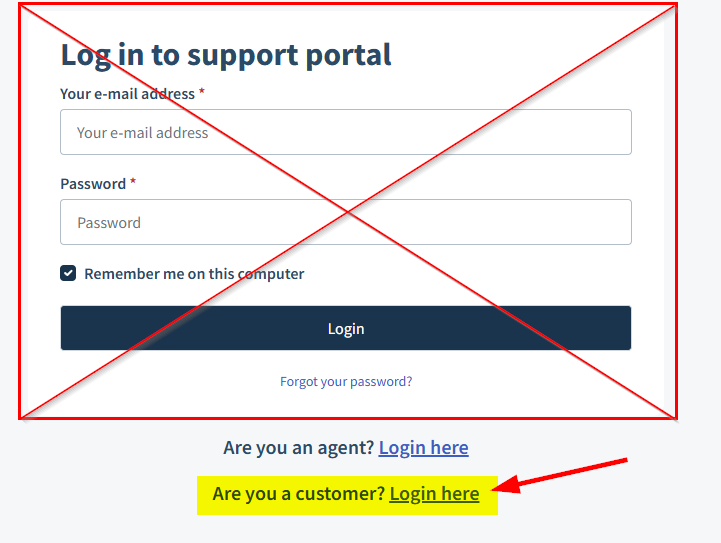
Why Use "Are you a customer? Login here"?
Hansen & Company Woodworks uses Microsoft Single Sign-On (SSO) to securely authenticate employees.
Using the SSO login provides:
Access using your HCo Microsoft 365 account
No separate Help Desk password to remember
Automatic access to internal knowledge base articles
Secure authentication through Microsoft Entra ID
How to Sign In
Navigate to the Help Center.
Scroll to the bottom of the sign-in panel.
Select Are you a customer? Login here.
Sign in using your HCo Microsoft 365 email address and password.
If prompted, complete Microsoft Multi-Factor Authentication (MFA).
After signing in, you will be returned to the Help Center and have access to all available resources.
Do Not Use the Standard Login Form
The email and password fields at the top of the page are intended for traditional Freshdesk accounts and do not use Microsoft Single Sign-On. If you enter your HCo email address and Microsoft password into this form, your login will fail because your account is authenticated through Microsoft instead.
Troubleshooting
I don't see the "Are you a customer? Login here" option.
Refresh the page and ensure you are using the correct Help Center URL. If the option is still missing, contact the IT Help Desk.
I receive a Microsoft sign-in error.
Verify that:
You are using your HCo Microsoft 365 account.
Your password is correct.
You complete any required Multi-Factor Authentication prompts.
I signed in but still can't view certain articles.
Some articles are restricted to authenticated employees. If you believe you should have access, contact the IT Help Desk.
Was this article helpful?
That’s Great!
Thank you for your feedback
Sorry! We couldn't be helpful
Thank you for your feedback
Feedback sent
We appreciate your effort and will try to fix the article